tna:
An R package for Transition Network Analysis

tna:
An R package for Transition Network Analysis




tna is an R package for the analysis of relational
dynamics through Transition Network Analysis (TNA). TNA provides tools
for building TNA models, plotting transition networks, calculating
centrality measures, and identifying dominant events and patterns. TNA
statistical techniques (e.g., bootstrapping and permutation tests)
ensure the reliability of observed insights and confirm that identified
dynamics are meaningful. See (Saqr et al., 2025)
for more details on TNA.

We have also released comprehensive new tutorials for the main TNA features:
| Tutorial | Link |
|---|---|
| An Updated Comprehensive Tutorial on Transition Network Analysis (TNA) | https://sonsoles.me/posts/tna-tutorial/ |
TNA Data Preparation: A Comprehensive Guide to
prepare_data() |
https://sonsoles.me/posts/tna-data/ |
| TNA Group Analysis: Analysis and Comparison of Groups | https://sonsoles.me/posts/tna-group/ |
| TNA Clustering: Discovering and Analysis of Clusters | https://sonsoles.me/posts/tna-clustering/ |
| TNA Model Comparison:TNA Model Comparison: A Comprehensive Guide to Network Comparison | https://sonsoles.me/posts/tna-compare/ |
Full reference guide on tna functions |
https://sonsoles.me/tna/tna.html |
Sequence Patterns, Outcomes, and Indices with
codyna |
https://sonsoles.me/posts/codyna-seq-tutorial/ |
Check out the tna R package vignettes:
| Vignette | Link |
|---|---|
| Getting started with tna | https://sonsoles.me/tna/articles/tna.html |
| A showcase of the main tna functions | https://sonsoles.me/tna/articles/complete_tutorial.html |
| How to prepare data for tna | https://sonsoles.me/tna/articles/prepare_data.html |
| Frequency-based TNA | https://sonsoles.me/tna/articles/ftna.html |
| Attention TNA | https://sonsoles.me/tna/articles/atna.html |
| Finding cliques and communities | https://sonsoles.me/tna/articles/communities_and_cliques.html |
| Using grouped sequence data | https://sonsoles.me/tna/articles/grouped_sequences.html |
Do not forget to check out our tutorials in the “Advanced learning analytics methods” book:
| Title | Pages | Tutorial |
|---|---|---|
| Saqr, M., Lopez-Pernas, S., & Tikka, S. Mapping Relational Dynamics with Transition Network Analysis: A Primer and Tutorial | https://doi.org/10.1007/978-3-031-95365-1_15 | Online tutorial |
| Saqr, M., Lopez-Pernas, S., & Tikka, S. Capturing the Breadth and Dynamics of the Temporal Processes with Frequency Transition Network Analysis: A Primer and Tutorial | https://doi.org/10.1007/978-3-031-95365-1_16 | Online tutorial |
| Lopez-Pernas, S., Tikka, S., & Saqr, M. Mining Patterns and Clusters with Transition Network Analysis: A Heterogeneity Approach | https://doi.org/10.1007/978-3-031-95365-1_17 | Online tutorial |
In addition to the tna R package, you can also try our
Shiny app and Jamovi plugin.
You can install the most recent stable version of tna
from CRAN or the
development version from GitHub by
running one of the following:
install.packages("tna")

# install.packages("devtools")
# devtools::install_github("sonsoleslp/tna")Load the package
library("tna")Example data
data("group_regulation", package = "tna")Build a Markov model
tna_model <- tna(group_regulation)summary(tna_model)| metric | value |
|---|---|
Plot the transition network
plot(tna_model) 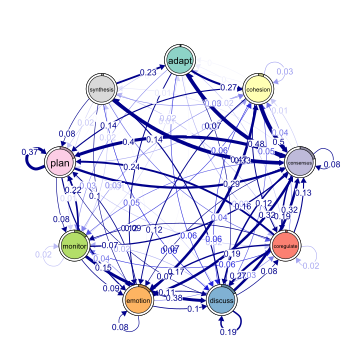 Calculate the centrality measures
cent <- centralities(tna_model)| state | OutStrength | InStrength | ClosenessIn | ClosenessOut | Closeness | Betweenness | BetweennessRSP | Diffusion | Clustering |
|---|---|---|---|---|---|---|---|---|---|
Plot the centrality measures
plot(cent, ncol = 3)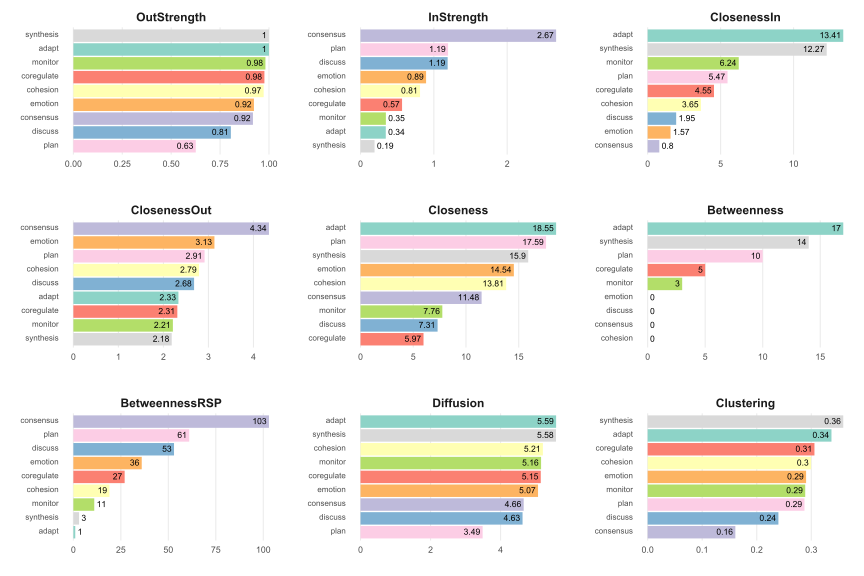
Estimate centrality stability
estimate_centrality_stability(tna_model)
#> Centrality Stability Coefficients
#>
#>  InStrength OutStrength Betweenness
#>         0.9         0.9         0.9
Identify and plot communities
coms <- communities(tna_model)
plot(coms)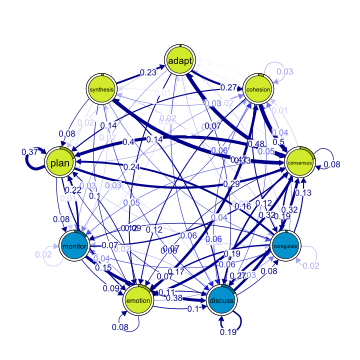
Find and plot cliques
cqs <- cliques(tna_model, threshold = 0.12)
plot(cqs)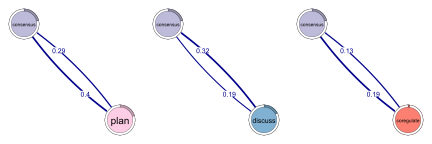
Compare high achievers (first 1000) with low achievers (last 1000)
tna_model_start_high <- tna(group_regulation[1:1000, ])
tna_model_start_low <- tna(group_regulation[1001:2000, ])
comparison <- permutation_test(
  tna_model_start_high,
  tna_model_start_low,
  measures = c("InStrength")
)
Simple comparison vs. permutation test comparison
plot_compare(tna_model_start_high, tna_model_start_low)
plot(comparison)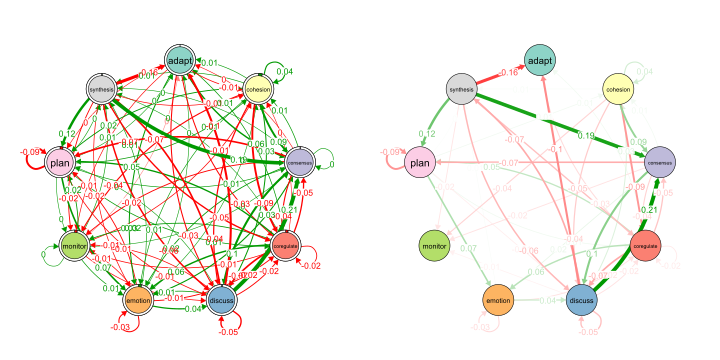
Compare centralities
print(comparison$centralities$stats)| state | centrality | diff_true | effect_size | p_value |
|---|---|---|---|---|