[](https://github.com/kaz-utashiro/App-week/actions?workflow=test) [](https://metacpan.org/release/App-week)
# NAME
week - colorful calendar command for ANSI terminal
# SYNOPSIS
**week** \[ -M_module_ \] \[ option \] \[ date \]
Options:
-#,-m# # months surrounding today (default 3)
-A # after current month
-B # before current month
-C[#] before and after current month (default 4)
-y year calendar
-Y[#] # years of calendar
-c # number of columns (default 3)
-p # print year on month-# (default current, 0 for none)
-P print year on all months
-W print week number
--theme theme
apply color theme
Color options:
--colormap specify colormap
--rgb24 use 24bit RGB color ANSI sequence
i18n options:
-l list i18n options
--i18n enable i18n options
--i18n-v display with Territory/Language information
Color modules:
-Mcolors
-Mnpb
-Molympic
# VERSION
Version 1.07
# DESCRIPTION
By default, the **week** command displays the previous, current and next
month surrounding today, just like the **-3** option of the [cal(1)](http://man.he.net/man1/cal) command.
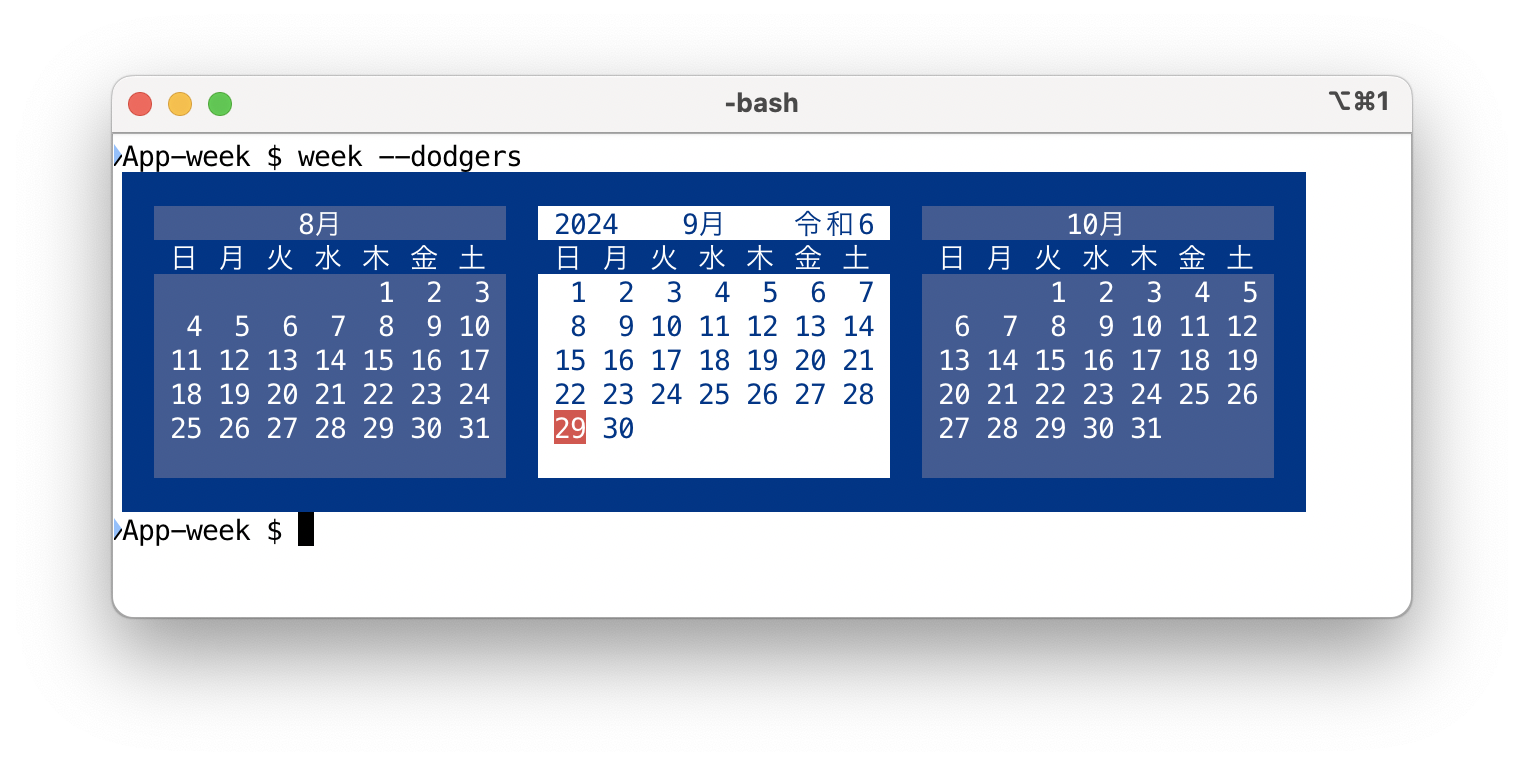
The number of months can be given with a dash or the **-m** option,
which can be combined with other parameters. **-c** option specifies number of
columns.
$ week -12
$ week -m21c7
The number of months before and after can be specified with the **-B**
and **-A** options, and **-C** for both.
$ week -B4 -A4
$ week -C4
A date can be given like:
$ week 2019/9/23
$ week 9/23 # 9/23 of current year
$ week 23 # 23rd of current month
And also in Japanese format and era:
$ week 2019年9月23日
$ week 平成31年9月23日
$ week H31.9.23
$ week 平成31
$ week 平31
$ week H31
A larger number is treated as a year. The next command displays the
calendar for the year 1752.
$ week 1752
Use the **-y** option to show a one-year calendar. The number of years
can be specified by the **-Y** option (must be 100 or less), which
implicitly sets the **-y** option.
$ week -y # display this year's calendar
$ week -Y2c6 # display 2 years calendar in 6 column
# INTERNATIONAL SUPPORT
It is possible to display the calendar in various languages by setting
locale environment variables.
LANG=et_EE week
LC_TIME=et_EE week
This command comes with the **-Mi18n** module, which provides an easy
way to specify a language by command option. Option **-l** displays
the option list provided by the **-Mi18n** module, and options
**--i18n** and **--i18n-v** enable them. When using **--i18n** options, the `LC_TIME` environment
variable is set to control date and time formatting specifically.
See [Getopt::EX::i18n](https://metacpan.org/pod/Getopt%3A%3AEX%3A%3Ai18n).
$ week --i18n-v --et
# JAPANESE ERA
By default, the chronological year is shown on the current month and
every January. When used in a Japanese locale environment, the year
on the right side is displayed in Japanese era (wareki: 和暦) format.
# WEEK NUMBER
Using the **-W** or **--weeknumber** option, the week number is printed
at the end of every week line. Week number 1 is the week that
includes January 1st, and it counts up every Sunday.

Option **-W2** prints the _standard week number_, which starts with
the first Sunday of the year.

Option **-W3** prints the ISO 8601 style week number. Because ISO
weeks start on Monday, and the command shows the number for the Sunday
of the week, the result is not intuitive and therefore, I guess,
useless.

Option **-W2** and **-W3** require [gcal(1)](http://man.he.net/man1/gcal) command installed.
# COLORMAP
Each field is labeled by names.
FRAME Enclosing frame
MONTH Month name
WEEK Day of the week
DAYS Calendar
THISMONTH Target month name
THISWEEK Target day of the week
THISDAYS Target calendar
THISDAY Target date
Color for each field can be specified by **--colormap** (**--cm**)
option with **LABEL**=_colorspec_ syntax. Default color is:
--colormap DAYS=L05/335 \
--colormap WEEK=L05/445 \
--colormap FRAME=L05/445 \
--colormap MONTH=L05/335 \
--colormap THISDAY=522/113 \
--colormap THISDAYS=555/113 \
--colormap THISWEEK=L05/445 \
--colormap THISMONTH=555/113
Besides above, color for day-of-week names (and week number) can be
specified individually by following labels. No color is assigned to
these labels by default.
DOW_SU Sunday
DOW_MO Monday
DOW_TU Tuesday
DOW_WE Wednesday
DOW_TH Thursday
DOW_FR Friday
DOW_SA Saturday
DOW_CW Week Number
Three digit means 216 RGB values from `000` to `555`, and `L01`
.. `L24` mean 24 gray scale levels. Colormap is handled by
[Getopt::EX::Colormap](https://metacpan.org/pod/Getopt%3A%3AEX%3A%3AColormap) module; use \`perldoc Getopt::EX::Colormap\` for
detail.
You can add a special effect afterward. For example, put next line in
your `~/.weekrc` to blink today. `$` indicates to move
all following arguments here, so that insert this option at the end.
option default $ --cm 'THISDAY=+F'
# I18N
- **--i18n**
- **--i18n-v**
Both of these enable I18N options, and Territory/Language information
is shown when **--i18n-v** is used. These options set the `LC_TIME`
environment variable to control date and time formatting specifically,
rather than the general `LANG` variable.
# MODULES
Some modules are included in the distribution. These options can be
used without any special action, because they are defined to load the
appropriate module automatically in the default startup module
([App::week::default](https://metacpan.org/pod/App%3A%3Aweek%3A%3Adefault)).
- **-Mcolors**
--mono
--lavender
--green
--pastel
- **-Mmlb** (Major League Baseball)
--dodgers, --dodgers-rev
--yankees, --yankees-rev
- **-Mnpb** (Nippon Professional Baseball Organization)
--tigers, --tigers-rev
--giants, --giants-rev
--lions, --lions-rev
- **-Molympic**
--tokyo2020, --tokyo2020-rev
--tokyo2020-gold, --tokyo2020-gold-rev
--para2020, --para2020-rev
- **--theme**
Option **--theme** is defined in the default module and chooses the
appropriate variant of the given theme according to the background
color of the terminal. If you have the following setting in your `~/.weekrc`:
option --theme tokyo2020
Option **--tokyo2020** is set for a light terminal, and
**--tokyo2020-rev** is set for a dark terminal.
Feel free to update these modules and send pull request to github
site.
# FILES
- `~/.weekrc`
Start up file. Use like this:
option default --i18n-v --theme tokyo2020
# INSTALL
## CPANMINUS
$ cpanm App::week
# SEE ALSO
[App::week](https://metacpan.org/pod/App%3A%3Aweek),
[https://github.com/kaz-utashiro/App-week](https://github.com/kaz-utashiro/App-week)
[Getopt::EX::termcolor](https://metacpan.org/pod/Getopt%3A%3AEX%3A%3Atermcolor),
[https://github.com/kaz-utashiro/Getopt-EX-termcolor](https://github.com/kaz-utashiro/Getopt-EX-termcolor)
[Getopt::EX::i18n](https://metacpan.org/pod/Getopt%3A%3AEX%3A%3Ai18n),
[https://github.com/kaz-utashiro/Getopt-EX-i18n](https://github.com/kaz-utashiro/Getopt-EX-i18n)
[Getopt::EX::Colormap](https://metacpan.org/pod/Getopt%3A%3AEX%3A%3AColormap)
[https://qiita.com/kaz-utashiro/items/603f4bca39e397afc91c](https://qiita.com/kaz-utashiro/items/603f4bca39e397afc91c)
[https://qiita.com/kaz-utashiro/items/38cb50a4d0cd34b6cce6](https://qiita.com/kaz-utashiro/items/38cb50a4d0cd34b6cce6)
[https://qiita.com/kaz-utashiro/items/be37a4d703f9d2208ed1](https://qiita.com/kaz-utashiro/items/be37a4d703f9d2208ed1)
# AUTHOR
Kazumasa Utashiro
# LICENSE
You can redistribute it and/or modify it under the same terms
as Perl itself.
# COPYRIGHT
The following copyright notice applies to all the files provided in
this distribution, including binary files, unless explicitly noted
otherwise.
Copyright ©︎ 2018-2026 Kazumasa Utashiro